
Dispositivos e redes
SpaceMosaic
Um mapa de espaço somente leitura, pasta por pasta. Descubra o que ocupa espaço em uma pasta com um mapa de tamanhos, sem apagar nem alterar nada.
- Versão
- v0.1.2, 29 de out. de 2026
- Funciona em
- App para desktop; APK para Android 8.0+; iOS exige sua própria assinatura
- Licença
- Apache-2.0
A descrição do projeto abaixo está em inglês.
Como é
O que faz
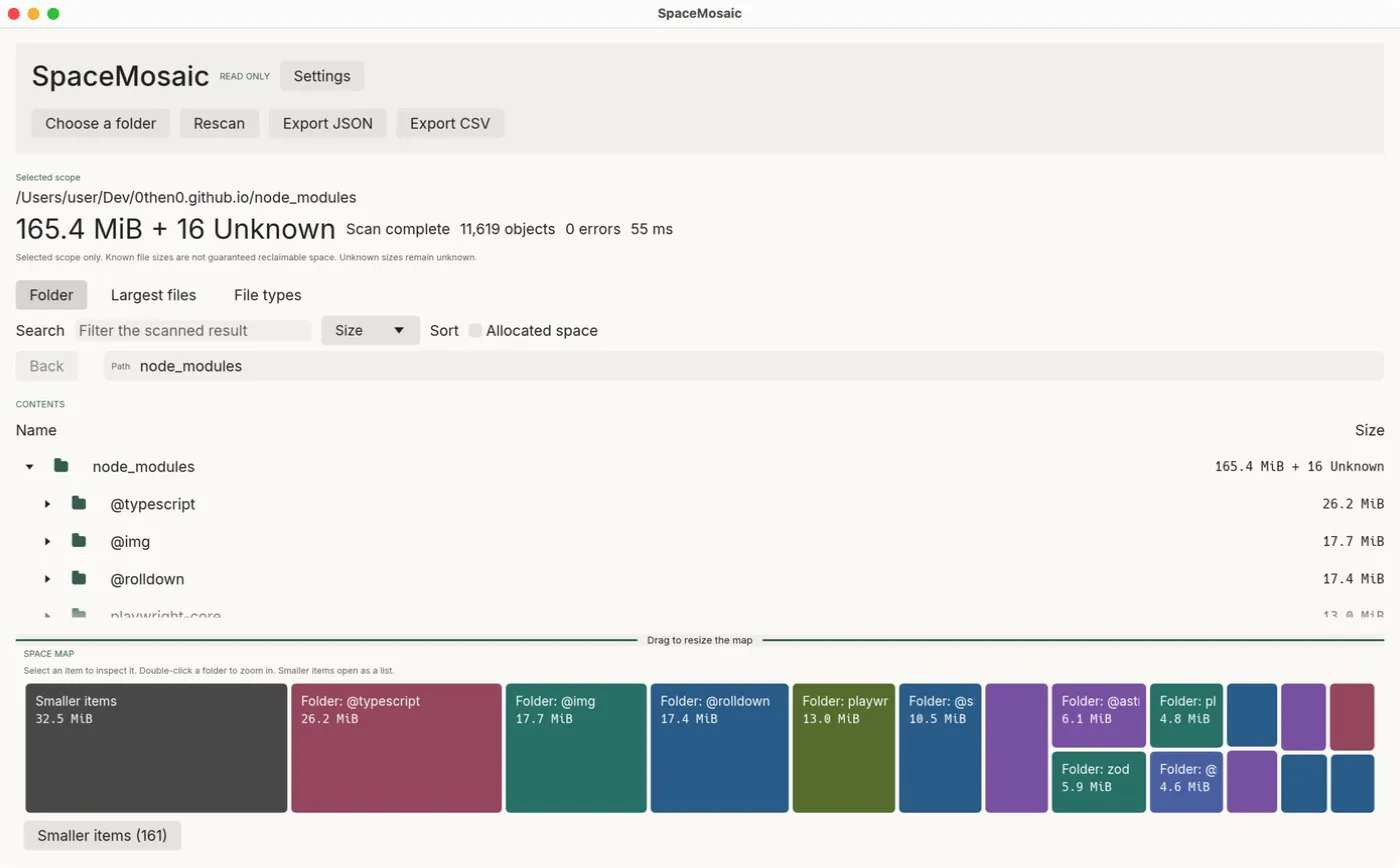
Choose a folder and SpaceMosaic shows how its size is distributed: a tree, a treemap, the largest files and a file-type summary. It reads file metadata only, never file contents, and has no delete or cleanup actions, so exploring cannot cause damage.
Para quem é
- People whose disk is filling up and who want to see which folders are responsible before deciding what to remove.
- Anyone who needs a size report for a folder, exported as JSON or CSV.
- Users who distrust cleanup tools: there is nothing to click that removes files.
Limitações
- It measures the selected folder, not the whole disk, and a size is not a promise of reclaimable space (hard links, APFS clones and compression).
- Desktop scans stop at 500,000 objects or about 256 MiB of metadata; mobile at 100,000 objects. The result is then marked partial.
- Windows and macOS builds are not signed with a publisher certificate; macOS is ad-hoc signed and not notarized.
- Symbolic links and Windows reparse points are not followed.
Usos comuns
Find the heavy folders
Scan a project, Downloads or a media folder and follow the largest tiles down the map. Double-click a folder to zoom in; small items are grouped into a searchable list.
Unknown stays unknown
Unreadable folders and unknown sizes are marked as Unknown instead of 0 B. Logical size and allocated space are shown separately, and a partial scan says why it is partial.
Share a report
Export the result as versioned JSON or a CSV file-type summary. Exports contain file names and paths, so review them before sharing.
Baixar
Última versão estável v0.1.2, publicada em 29 de out. de 2026. Notas da versão de v0.1.2. Dados de versões consultados em 31 de out. de 2026 no GitHub Releases.
macOS
- Open the DMG and drag SpaceMosaic.app to Applications.
- If macOS blocks the first launch, approve it in System Settings → Privacy & Security.
Outros formatos (1)
- Arquivo ZIP, macOS Apple Silicon (arm64) · Apple Silicon (arm64) · 9,7 MB · Assinatura ad hoc, sem notarização
Extract and open spacemosaic-darwin-arm64/SpaceMosaic.app.
Windows
- Run the installer. It installs for the current user without administrator rights.
- Windows may warn about an unrecognised app because the installer has no Authenticode signature.
Outros formatos (1)
- ZIP portátil, Windows x86-64 · x86-64 · 9,5 MB · Sem assinatura
Extract the complete archive and run spacemosaic.exe.
Linux
- Install with apt so dependencies are resolved: sudo apt install ./spacemosaic-linux-x86_64.deb
Outros formatos (1)
- Arquivo portátil (.tar.gz), Linux x86-64 · x86-64 · 12 MB · Sem assinatura
Extract and run spacemosaic. Compatible system libraries are required.
Android
- Allow installation from your browser or file manager, then open the APK.
- If you installed an alpha.2 or alpha.3 debug APK before, uninstall it first: the signing certificates differ.
iOS
Sem instalação comum disponível. Para iOS, só estes builds são publicados:
spacemosaic-device.zip: Exige sua própria assinatura e perfil de provisionamento. Not an installable IPA. Sign it in Xcode with your own development team.spacemosaic-simulator.zip: Somente simulador, não para dispositivos. For the iOS Simulator on an Apple Silicon Mac only.
Desenvolvedores podem encontrá-los na página da versão ou compilar a partir do código-fonte.
As etapas de instalação estão em inglês.
Os builds para iOS são publicados só para desenvolvedores: o build para dispositivo precisa ser assinado no Xcode, e o do simulador não roda em iPhone.
Verificar um download
SHA256SUMS lista os hashes SHA-256 dos arquivos da versão. Um hash igual mostra que o seu arquivo é idêntico ao publicado. É uma soma de verificação, não uma assinatura do autor: não prova quem compilou o arquivo.
shasum -a 256 -c --ignore-missing SHA256SUMSPrimeiro uso
Install the build for your system from the download section.
On macOS, the first launch may be blocked because the app is not notarized. Approve it in System Settings → Privacy & Security.
Choose a folder with the button, drag one into the window, or pass a path on the command line:
spacemosaic /path/to/folderFollow the largest tiles. Select a tile to see its details, or open Largest files and File types.
Plataformas e como foram verificadas
- macOS, Apple SiliconVerificado em funcionamento
The desktop app runs on macOS arm64. There is no Intel build.
- Android 8.0+Testado por um usuário em um dispositivo
Reported as relatively stable on a Pixel 8 with Android 17. In-place upgrades, screen readers and every storage provider are not verified.
- Windows x86-64Compila e passa nas verificações automáticas da CI
Builds in CI. An earlier alpha was tried on Windows 11; later fixes still need revalidation there.
- Linux x86-64Compila e passa nas verificações automáticas da CI
Built on Ubuntu 24.04. Portable archives still need compatible system libraries.
- iOS 16+Compila e passa nas verificações automáticas da CI
Unsigned device build and simulator build only. Installing on an iPhone requires Xcode, a development team and signing.
Documentação e suporte
Perguntas e relatos de bugs vão para o rastreador de issues do projeto. Relate problemas de segurança como descrito na política de segurança.