
Устройства и сети
SpaceMosaic
Карта занятого места для одной папки, только чтение. Посмотреть, что занимает место в папке, на карте размеров, ничего не удаляя и не изменяя.
- Релиз
- v0.1.2, 29 окт. 2026 г.
- Где работает
- Настольное приложение; APK для Android 8.0+; для iOS нужна собственная подпись
- Лицензия
- Apache-2.0
Описание проекта ниже — на английском.
Как это выглядит
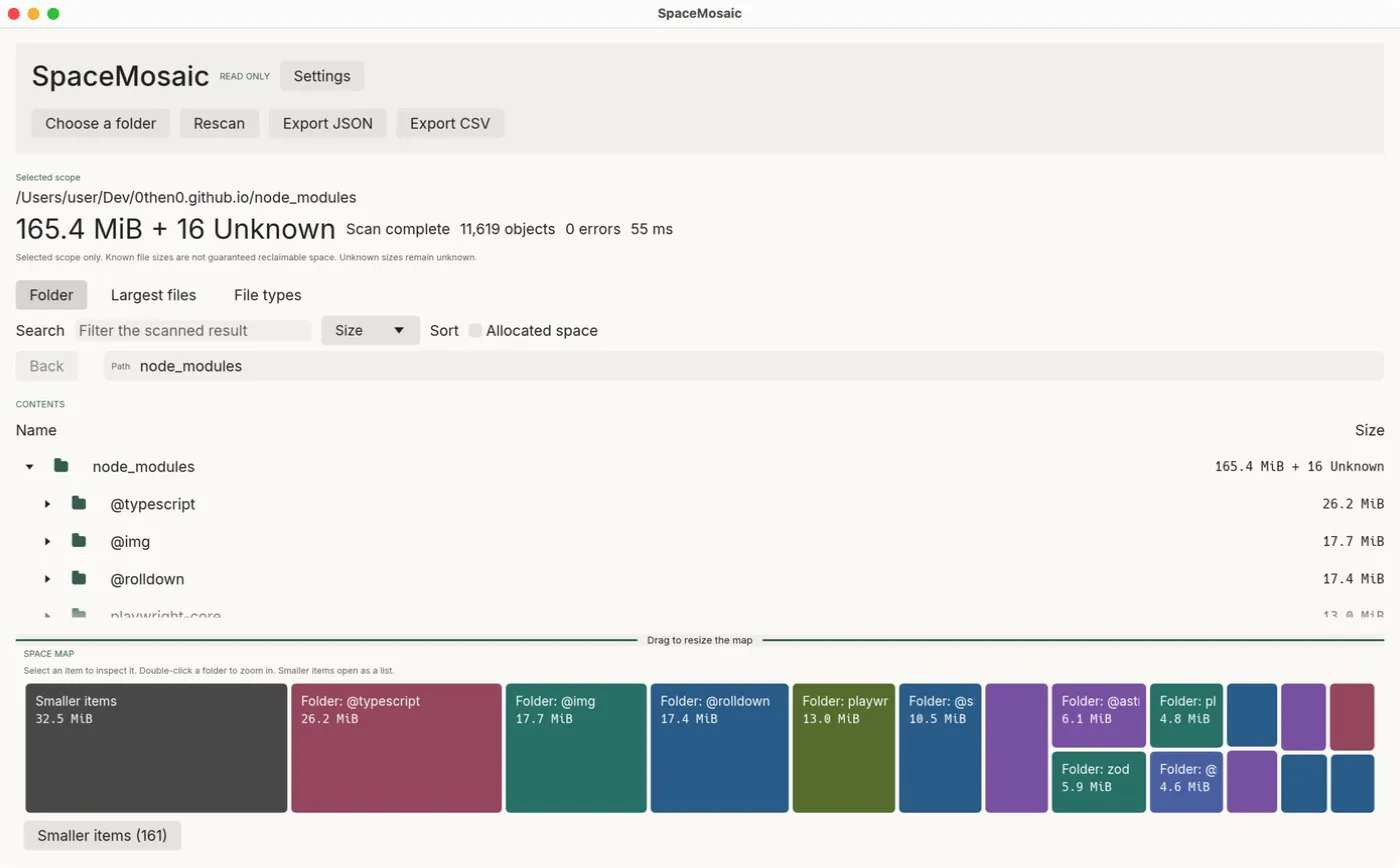
Что делает
Choose a folder and SpaceMosaic shows how its size is distributed: a tree, a treemap, the largest files and a file-type summary. It reads file metadata only, never file contents, and has no delete or cleanup actions, so exploring cannot cause damage.
Для кого
- People whose disk is filling up and who want to see which folders are responsible before deciding what to remove.
- Anyone who needs a size report for a folder, exported as JSON or CSV.
- Users who distrust cleanup tools: there is nothing to click that removes files.
Ограничения
- It measures the selected folder, not the whole disk, and a size is not a promise of reclaimable space (hard links, APFS clones and compression).
- Desktop scans stop at 500,000 objects or about 256 MiB of metadata; mobile at 100,000 objects. The result is then marked partial.
- Windows and macOS builds are not signed with a publisher certificate; macOS is ad-hoc signed and not notarized.
- Symbolic links and Windows reparse points are not followed.
Типичные сценарии
Find the heavy folders
Scan a project, Downloads or a media folder and follow the largest tiles down the map. Double-click a folder to zoom in; small items are grouped into a searchable list.
Unknown stays unknown
Unreadable folders and unknown sizes are marked as Unknown instead of 0 B. Logical size and allocated space are shown separately, and a partial scan says why it is partial.
Share a report
Export the result as versioned JSON or a CSV file-type summary. Exports contain file names and paths, so review them before sharing.
Скачать
Последний стабильный релиз v0.1.2, опубликован 29 окт. 2026 г.. Примечания к релизу для v0.1.2. Данные о релизах проверены 31 окт. 2026 г. по GitHub Releases.
macOS
- Open the DMG and drag SpaceMosaic.app to Applications.
- If macOS blocks the first launch, approve it in System Settings → Privacy & Security.
Другие форматы (1)
- Архив ZIP, macOS Apple Silicon (arm64) · Apple Silicon (arm64) · 9,7 МБ · Подпись ad-hoc, без нотаризации
Extract and open spacemosaic-darwin-arm64/SpaceMosaic.app.
Windows
- Run the installer. It installs for the current user without administrator rights.
- Windows may warn about an unrecognised app because the installer has no Authenticode signature.
Другие форматы (1)
- Портативный ZIP, Windows x86-64 · x86-64 · 9,5 МБ · Без подписи
Extract the complete archive and run spacemosaic.exe.
Linux
- Install with apt so dependencies are resolved: sudo apt install ./spacemosaic-linux-x86_64.deb
Другие форматы (1)
- Портативный архив (.tar.gz), Linux x86-64 · x86-64 · 12 МБ · Без подписи
Extract and run spacemosaic. Compatible system libraries are required.
Android
- Allow installation from your browser or file manager, then open the APK.
- If you installed an alpha.2 or alpha.3 debug APK before, uninstall it first: the signing certificates differ.
iOS
Обычной установки нет. Для платформы iOS опубликованы только эти сборки:
spacemosaic-device.zip: Нужны собственная подпись и профиль. Not an installable IPA. Sign it in Xcode with your own development team.spacemosaic-simulator.zip: Только для симулятора. For the iOS Simulator on an Apple Silicon Mac only.
Разработчики найдут их на странице релиза или могут собрать из исходников.
Шаги установки — на английском.
Сборки для iOS публикуются только для разработчиков: сборку для устройства нужно подписать в Xcode, а сборка для симулятора не запускается на iPhone.
Проверка загрузки
В SHA256SUMS перечислены хеши SHA-256 файлов релиза. Совпадение хеша показывает, что ваш файл идентичен загруженному в релиз. Это контрольная сумма, а не подпись автора: она не доказывает, кто собрал файл.
shasum -a 256 -c --ignore-missing SHA256SUMSПервый запуск
Install the build for your system from the download section.
On macOS, the first launch may be blocked because the app is not notarized. Approve it in System Settings → Privacy & Security.
Choose a folder with the button, drag one into the window, or pass a path on the command line:
spacemosaic /path/to/folderFollow the largest tiles. Select a tile to see its details, or open Largest files and File types.
Платформы и как они проверены
- macOS, Apple SiliconПроверено в работе
The desktop app runs on macOS arm64. There is no Intel build.
- Android 8.0+Проверено пользователем на одном устройстве
Reported as relatively stable on a Pixel 8 with Android 17. In-place upgrades, screen readers and every storage provider are not verified.
- Windows x86-64Собирается и проходит автоматические проверки в CI
Builds in CI. An earlier alpha was tried on Windows 11; later fixes still need revalidation there.
- Linux x86-64Собирается и проходит автоматические проверки в CI
Built on Ubuntu 24.04. Portable archives still need compatible system libraries.
- iOS 16+Собирается и проходит автоматические проверки в CI
Unsigned device build and simulator build only. Installing on an iPhone requires Xcode, a development team and signing.
Документация и поддержка
Вопросы и сообщения об ошибках — в трекер задач проекта. О проблемах безопасности сообщайте так, как описано в его политике безопасности.