
学習と語学
Cambridge Dictionary Audio
単語カードとリスニング練習のための発音音声。英単語のアメリカ英語とイギリス英語の発音を MP3 で保存。IPA、定義、Anki への書き出しにも対応。
- リリース
- v1.0.1, 2026年10月31日
- 動作環境
- デスクトップアプリ、ターミナルアプリ、Chrome/Firefox 拡張機能、Python CLI
- ライセンス
- Apache-2.0(継承部分は MIT)
astrosander/cambridge-dictionary-audio のフォーク。 大幅に独自開発を加えた独立フォーク。デスクトップ・ターミナル・モバイルアプリ、ブラウザー拡張機能、Anki への書き出しはここで追加されました。
以下のプロジェクト説明は英語です。
画面
できること
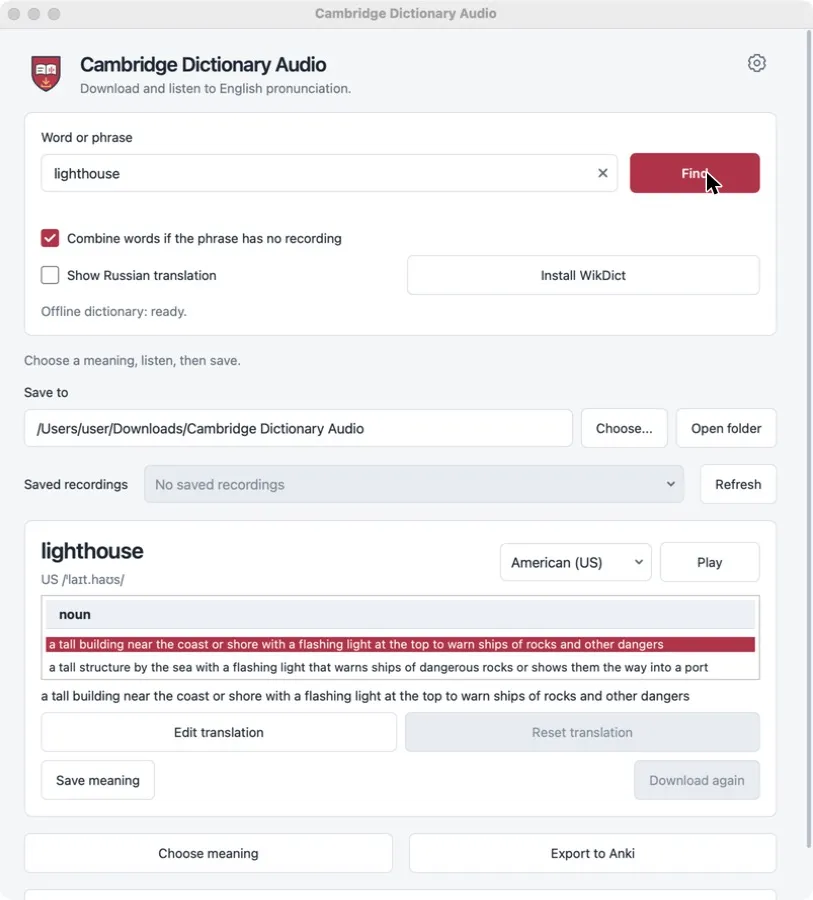
Look up an English word or phrase, pick the meaning, listen to the American or British recording, and save it as an MP3. Saved words form a small offline collection that can be exported to Anki as a ready deck with audio. The project is an independent tool, not an official Cambridge product; dictionary content remains subject to Cambridge’s website terms.
対象
- Learners of English who build their own Anki decks.
- Teachers who prepare listening material with US and UK variants.
- Anyone who wants a local folder of pronunciation files rather than a browser tab.
制限事項
- Recordings, IPA and definitions come from dictionary.cambridge.org and remain subject to its terms; the project’s license does not cover that content.
- Dictionary translations are available in Russian only. The interface has seven languages.
- Phrase synthesis joins single-word recordings; it is not a recording of the whole phrase.
- No mobile build is ready for ordinary installation yet.
主な使い方
Collect words while reading
Enter a word, check the IPA and definition, play it, and save the meaning. Both accents can be saved for the same word.
Make an Anki deck
Export the collection to one .apkg file with a card template, audio and source notes. Re-exporting updates existing cards instead of duplicating them.
Grab audio from the dictionary page
The Chrome and Firefox extension downloads the recording from the dictionary page you have open, without the desktop app.
ダウンロード
最新の安定版 v1.0.1(2026年10月31日 公開)。 リリースノート (v1.0.1). リリース情報は 2026年10月31日 に GitHub Releases から取得しました。
Windows
- Run the installer. Windows may warn because it has no publisher signature.
その他の形式(1)
- ポータブル ZIP, Windows x86-64 · x86-64 · 64 MB · 署名なし
Extract the archive and run the application from the extracted folder.
macOS
- Open the DMG and drag the app to Applications.
- The build is not notarized; approve the first launch in System Settings → Privacy & Security.
- Open the DMG and drag the app to Applications.
- The build is not notarized; approve the first launch in System Settings → Privacy & Security.
その他の形式(2)
- インストーラーパッケージ(.pkg), macOS Apple Silicon (arm64) · Apple Silicon (arm64) · 48 MB · 署名なし
Open the package and follow the installer. - インストーラーパッケージ(.pkg), macOS Intel (x86-64) · Intel (x86-64) · 51 MB · 署名なし
Open the package and follow the installer.
Linux
- Install with your package manager, for example: sudo apt install ./cambridge-dictionary-audio_*_amd64.deb
- Install with your package manager, for example: sudo dnf install ./cambridge-dictionary-audio-*.x86_64.rpm
その他の形式(1)
- ポータブルアーカイブ(.tar.gz), Linux x86-64 · x86-64 · 91 MB · 署名なし
Extract and run the application from the extracted folder.
ブラウザー拡張機能
利用できるファイル(2)
- Chrome 拡張機能(.zip), ブラウザー拡張機能 Chrome · Chrome · 25 KB · 署名なし
Extract the ZIP, open chrome://extensions, enable Developer mode and choose Load unpacked. - Firefox 拡張機能(.zip), ブラウザー拡張機能 Firefox · Firefox · 25 KB · 署名なし
Open about:debugging, choose Load Temporary Add-on and select manifest.json. Firefox removes temporary add-ons when it restarts.
Android
通常のインストール方法はありません。 Android 向けに公開されているのは次のビルドのみです:
cambridge-audio-1.0.1-android-debug-TEST-ONLY.apk: デバッグビルド(テスト専用). Uses a development certificate. For testing only.cambridge-audio-1.0.1-android-unsigned-NOT-INSTALLABLE.apk: 署名なしのため、そのままではインストール不可. Must be signed before installation.
iOS
通常のインストール方法はありません。 iOS 向けに公開されているのは次のビルドのみです:
cambridge-audio-1.0.1-ios-device-unsigned-REQUIRES-SIGNING.tar.gz: 独自の署名とプロビジョニングが必要. Requires your own signing and provisioning profile.cambridge-audio-1.0.1-ios-simulator-NOT-FOR-DEVICE.tar.gz: シミュレーター専用(実機不可). Runs only in the iOS Simulator.
インストール手順は英語です。
Android と iOS のビルドはテストと開発用にのみ公開しています。Android の APK はデバッグ版と署名なし版で、iOS のアーカイブは独自の署名が必要です。ここでは通常のインストールとして案内していません。
PyPI からインストール
uv tool install cambridge-dictionary-audioダウンロードの検証
SHA256SUMS.txt にはリリースファイルの SHA-256 ハッシュが記載されています。ハッシュが一致すれば、ファイルはリリースで公開されたものと同一です。これはチェックサムであり作者の署名ではないため、誰がビルドしたかは証明しません。
shasum -a 256 -c --ignore-missing SHA256SUMS.txt初めて使うとき
Install the desktop build for your system. On macOS and Windows, confirm the unsigned-app prompt.
Type a word or phrase and press Find. Choose a meaning and an accent, then press Play.
Press Save meaning. Files go to “Cambridge Dictionary Audio” in your Downloads folder unless you choose another one.
Prefer the terminal? Install the CLI and save a recording in one command:
uv tool install cambridge-dictionary-audio
cambridge-audio hello --accent both
対応環境と確認方法
- Windows 10+, macOS 14+, Linux x86-64 (glibc 2.34+)CI でビルドと自動チェックに合格
Desktop installers and portable builds are produced and checked in CI. They are not signed with a publisher certificate; macOS builds are not notarized.
- Python CLICI でビルドと自動チェックに合格
Python 3.10 to 3.15. Published on PyPI without the desktop GUI.
- Chrome and FirefoxCI でビルドと自動チェックに合格
Unpacked extension ZIPs; not published in the browser stores.
- Android 9+CI でビルドと自動チェックに合格
Only a debug test APK and an unsigned APK are published. Physical-device testing is not recorded.
- iOS 17+CI でビルドと自動チェックに合格
Unsigned device archive and simulator build. Installing requires your own signing and provisioning.
ドキュメントとサポート
質問やバグ報告はプロジェクトのIssue トラッカーへ。セキュリティ上の問題はセキュリティポリシーに従って報告してください。