
Обучение и языки
Cambridge Dictionary Audio
Записи произношения для карточек и тренировки восприятия на слух. Сохранять американское и британское произношение английских слов в MP3 вместе с IPA, определениями и экспортом в Anki.
- Релиз
- v1.0.1, 31 окт. 2026 г.
- Где работает
- Настольное приложение, терминальное приложение, расширение Chrome/Firefox, Python CLI
- Лицензия
- Apache-2.0 (унаследованные части — MIT)
Форк astrosander/cambridge-dictionary-audio. Самостоятельный форк с большой собственной доработкой: здесь добавлены настольное, терминальное и мобильные приложения, расширения браузера и экспорт в Anki.
Описание проекта ниже — на английском.
Как это выглядит
Что делает
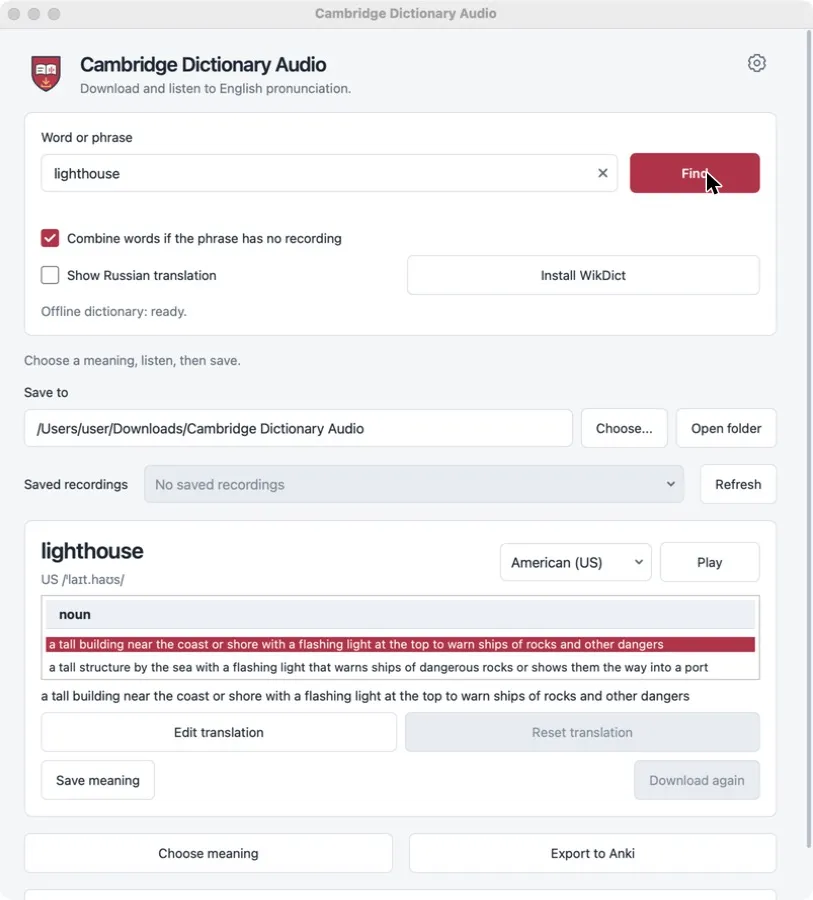
Look up an English word or phrase, pick the meaning, listen to the American or British recording, and save it as an MP3. Saved words form a small offline collection that can be exported to Anki as a ready deck with audio. The project is an independent tool, not an official Cambridge product; dictionary content remains subject to Cambridge’s website terms.
Для кого
- Learners of English who build their own Anki decks.
- Teachers who prepare listening material with US and UK variants.
- Anyone who wants a local folder of pronunciation files rather than a browser tab.
Ограничения
- Recordings, IPA and definitions come from dictionary.cambridge.org and remain subject to its terms; the project’s license does not cover that content.
- Dictionary translations are available in Russian only. The interface has seven languages.
- Phrase synthesis joins single-word recordings; it is not a recording of the whole phrase.
- No mobile build is ready for ordinary installation yet.
Типичные сценарии
Collect words while reading
Enter a word, check the IPA and definition, play it, and save the meaning. Both accents can be saved for the same word.
Make an Anki deck
Export the collection to one .apkg file with a card template, audio and source notes. Re-exporting updates existing cards instead of duplicating them.
Grab audio from the dictionary page
The Chrome and Firefox extension downloads the recording from the dictionary page you have open, without the desktop app.
Скачать
Последний стабильный релиз v1.0.1, опубликован 31 окт. 2026 г.. Примечания к релизу для v1.0.1. Данные о релизах проверены 31 окт. 2026 г. по GitHub Releases.
Windows
- Run the installer. Windows may warn because it has no publisher signature.
Другие форматы (1)
- Портативный ZIP, Windows x86-64 · x86-64 · 64 МБ · Без подписи
Extract the archive and run the application from the extracted folder.
macOS
- Open the DMG and drag the app to Applications.
- The build is not notarized; approve the first launch in System Settings → Privacy & Security.
- Open the DMG and drag the app to Applications.
- The build is not notarized; approve the first launch in System Settings → Privacy & Security.
Другие форматы (2)
- Пакет установщика (.pkg), macOS Apple Silicon (arm64) · Apple Silicon (arm64) · 48 МБ · Без подписи
Open the package and follow the installer. - Пакет установщика (.pkg), macOS Intel (x86-64) · Intel (x86-64) · 51 МБ · Без подписи
Open the package and follow the installer.
Linux
- Install with your package manager, for example: sudo apt install ./cambridge-dictionary-audio_*_amd64.deb
- Install with your package manager, for example: sudo dnf install ./cambridge-dictionary-audio-*.x86_64.rpm
Другие форматы (1)
- Портативный архив (.tar.gz), Linux x86-64 · x86-64 · 91 МБ · Без подписи
Extract and run the application from the extracted folder.
Расширение браузера
Доступные файлы (2)
- Расширение Chrome (.zip), Расширение браузера Chrome · Chrome · 25 кБ · Без подписи
Extract the ZIP, open chrome://extensions, enable Developer mode and choose Load unpacked. - Расширение Firefox (.zip), Расширение браузера Firefox · Firefox · 25 кБ · Без подписи
Open about:debugging, choose Load Temporary Add-on and select manifest.json. Firefox removes temporary add-ons when it restarts.
Android
Обычной установки нет. Для платформы Android опубликованы только эти сборки:
cambridge-audio-1.0.1-android-debug-TEST-ONLY.apk: Отладочная сборка, только для тестов. Uses a development certificate. For testing only.cambridge-audio-1.0.1-android-unsigned-NOT-INSTALLABLE.apk: Без подписи, в таком виде не устанавливается. Must be signed before installation.
Разработчики найдут их на странице релиза или могут собрать из исходников.
iOS
Обычной установки нет. Для платформы iOS опубликованы только эти сборки:
cambridge-audio-1.0.1-ios-device-unsigned-REQUIRES-SIGNING.tar.gz: Нужны собственная подпись и профиль. Requires your own signing and provisioning profile.cambridge-audio-1.0.1-ios-simulator-NOT-FOR-DEVICE.tar.gz: Только для симулятора. Runs only in the iOS Simulator.
Разработчики найдут их на странице релиза или могут собрать из исходников.
Шаги установки — на английском.
Сборки для Android и iOS публикуются только для тестирования и разработки: APK для Android — отладочный и неподписанный, а архивы iOS требуют собственной подписи. Как обычная установка они здесь не предлагаются.
Установка из PyPI
uv tool install cambridge-dictionary-audioСтраница пакета: pypi.org/project/cambridge-dictionary-audio/
Проверка загрузки
В SHA256SUMS.txt перечислены хеши SHA-256 файлов релиза. Совпадение хеша показывает, что ваш файл идентичен загруженному в релиз. Это контрольная сумма, а не подпись автора: она не доказывает, кто собрал файл.
shasum -a 256 -c --ignore-missing SHA256SUMS.txtПервый запуск
Install the desktop build for your system. On macOS and Windows, confirm the unsigned-app prompt.
Type a word or phrase and press Find. Choose a meaning and an accent, then press Play.
Press Save meaning. Files go to “Cambridge Dictionary Audio” in your Downloads folder unless you choose another one.
Prefer the terminal? Install the CLI and save a recording in one command:
uv tool install cambridge-dictionary-audio
cambridge-audio hello --accent both
Платформы и как они проверены
- Windows 10+, macOS 14+, Linux x86-64 (glibc 2.34+)Собирается и проходит автоматические проверки в CI
Desktop installers and portable builds are produced and checked in CI. They are not signed with a publisher certificate; macOS builds are not notarized.
- Python CLIСобирается и проходит автоматические проверки в CI
Python 3.10 to 3.15. Published on PyPI without the desktop GUI.
- Chrome and FirefoxСобирается и проходит автоматические проверки в CI
Unpacked extension ZIPs; not published in the browser stores.
- Android 9+Собирается и проходит автоматические проверки в CI
Only a debug test APK and an unsigned APK are published. Physical-device testing is not recorded.
- iOS 17+Собирается и проходит автоматические проверки в CI
Unsigned device archive and simulator build. Installing requires your own signing and provisioning.
Документация и поддержка
- Документация
- Исходный код
- Вопросы и ошибки
- Лицензия (Apache-2.0 (унаследованные части — MIT))
- Журнал изменений
- Все релизы
Вопросы и сообщения об ошибках — в трекер задач проекта. О проблемах безопасности сообщайте так, как описано в его политике безопасности.