
Learning and languages
Cambridge Dictionary Audio
Pronunciation clips for flashcards and listening practice. Save US and UK pronunciation recordings of English words as MP3 files, with IPA, definitions and Anki export.
- Release
- v1.0.1, Oct 31, 2026
- Runs on
- Desktop app, terminal app, Chrome/Firefox extension, Python CLI
- License
- Apache-2.0 (inherited parts MIT)
Fork of astrosander/cambridge-dictionary-audio. Independent fork with substantial development: desktop, terminal and mobile apps, browser extensions and Anki export were added here.
What it looks like
What it does
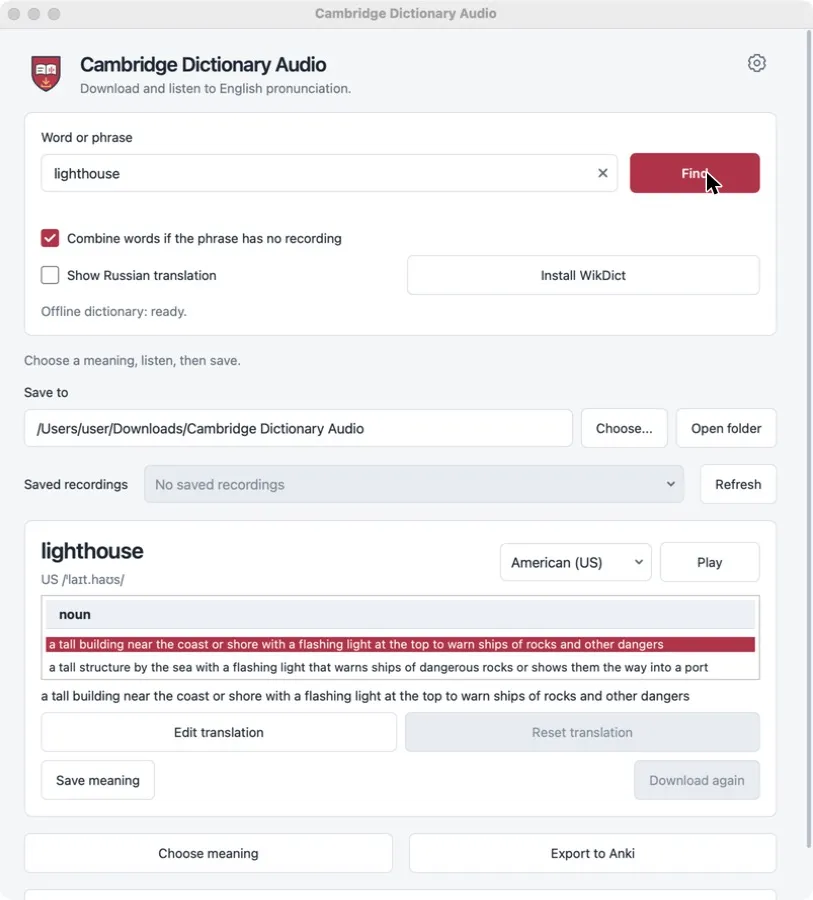
Look up an English word or phrase, pick the meaning, listen to the American or British recording, and save it as an MP3. Saved words form a small offline collection that can be exported to Anki as a ready deck with audio. The project is an independent tool, not an official Cambridge product; dictionary content remains subject to Cambridge’s website terms.
Who it is for
- Learners of English who build their own Anki decks.
- Teachers who prepare listening material with US and UK variants.
- Anyone who wants a local folder of pronunciation files rather than a browser tab.
Limitations
- Recordings, IPA and definitions come from dictionary.cambridge.org and remain subject to its terms; the project’s license does not cover that content.
- Dictionary translations are available in Russian only. The interface has seven languages.
- Phrase synthesis joins single-word recordings; it is not a recording of the whole phrase.
- No mobile build is ready for ordinary installation yet.
Typical uses
Collect words while reading
Enter a word, check the IPA and definition, play it, and save the meaning. Both accents can be saved for the same word.
Make an Anki deck
Export the collection to one .apkg file with a card template, audio and source notes. Re-exporting updates existing cards instead of duplicating them.
Grab audio from the dictionary page
The Chrome and Firefox extension downloads the recording from the dictionary page you have open, without the desktop app.
Download
Latest stable release v1.0.1, published Oct 31, 2026. Release notes for v1.0.1. Release data checked Oct 31, 2026 from GitHub Releases.
Windows
- Run the installer. Windows may warn because it has no publisher signature.
Other formats (1)
- Portable ZIP, Windows x86-64 · x86-64 · 64 MB · Unsigned
Extract the archive and run the application from the extracted folder.
macOS
- Open the DMG and drag the app to Applications.
- The build is not notarized; approve the first launch in System Settings → Privacy & Security.
- Open the DMG and drag the app to Applications.
- The build is not notarized; approve the first launch in System Settings → Privacy & Security.
Other formats (2)
- Installer package (.pkg), macOS Apple Silicon (arm64) · Apple Silicon (arm64) · 48 MB · Unsigned
Open the package and follow the installer. - Installer package (.pkg), macOS Intel (x86-64) · Intel (x86-64) · 51 MB · Unsigned
Open the package and follow the installer.
Linux
- Install with your package manager, for example: sudo apt install ./cambridge-dictionary-audio_*_amd64.deb
- Install with your package manager, for example: sudo dnf install ./cambridge-dictionary-audio-*.x86_64.rpm
Other formats (1)
- Portable archive (.tar.gz), Linux x86-64 · x86-64 · 91 MB · Unsigned
Extract and run the application from the extracted folder.
Browser extension
Available files (2)
- Chrome extension (.zip), Browser extension Chrome · Chrome · 25 kB · Unsigned
Extract the ZIP, open chrome://extensions, enable Developer mode and choose Load unpacked. - Firefox extension (.zip), Browser extension Firefox · Firefox · 25 kB · Unsigned
Open about:debugging, choose Load Temporary Add-on and select manifest.json. Firefox removes temporary add-ons when it restarts.
Android
Not available as a regular install. Only these builds are published for Android:
cambridge-audio-1.0.1-android-debug-TEST-ONLY.apk: Debug build for testing only. Uses a development certificate. For testing only.cambridge-audio-1.0.1-android-unsigned-NOT-INSTALLABLE.apk: Unsigned, cannot be installed as is. Must be signed before installation.
Developers can find them on the release page or build from source.
iOS
Not available as a regular install. Only these builds are published for iOS:
cambridge-audio-1.0.1-ios-device-unsigned-REQUIRES-SIGNING.tar.gz: Requires your own signing and provisioning. Requires your own signing and provisioning profile.cambridge-audio-1.0.1-ios-simulator-NOT-FOR-DEVICE.tar.gz: Simulator only, not for devices. Runs only in the iOS Simulator.
Developers can find them on the release page or build from source.
Android and iOS builds are published for testing and development only: the Android APKs are a debug build and an unsigned build, and the iOS archives need your own signing. They are not offered here as regular installs.
Install from PyPI
uv tool install cambridge-dictionary-audioPackage page: pypi.org/project/cambridge-dictionary-audio/
Verify a download
SHA256SUMS.txt lists SHA-256 hashes for the release files. A matching hash shows that your file is identical to the one uploaded with the release. It is a checksum, not a signature from the author: it does not prove who built the file.
shasum -a 256 -c --ignore-missing SHA256SUMS.txtFirst run
Install the desktop build for your system. On macOS and Windows, confirm the unsigned-app prompt.
Type a word or phrase and press Find. Choose a meaning and an accent, then press Play.
Press Save meaning. Files go to “Cambridge Dictionary Audio” in your Downloads folder unless you choose another one.
Prefer the terminal? Install the CLI and save a recording in one command:
uv tool install cambridge-dictionary-audio
cambridge-audio hello --accent both
Platforms and how they were checked
- Windows 10+, macOS 14+, Linux x86-64 (glibc 2.34+)Builds and passes automated checks in CI
Desktop installers and portable builds are produced and checked in CI. They are not signed with a publisher certificate; macOS builds are not notarized.
- Python CLIBuilds and passes automated checks in CI
Python 3.10 to 3.15. Published on PyPI without the desktop GUI.
- Chrome and FirefoxBuilds and passes automated checks in CI
Unpacked extension ZIPs; not published in the browser stores.
- Android 9+Builds and passes automated checks in CI
Only a debug test APK and an unsigned APK are published. Physical-device testing is not recorded.
- iOS 17+Builds and passes automated checks in CI
Unsigned device archive and simulator build. Installing requires your own signing and provisioning.
Documentation and support
- Documentation
- Source code
- Issues and support
- License (Apache-2.0 (inherited parts MIT))
- Changelog
- All releases
Questions and bug reports go to the project’s issue tracker. Report security problems as described in its security policy.