
Dokumente und Forschung
MarginCarry
Lesenotizen behalten, wenn ein Artikel eine neue Fassung bekommt. Zotero-Hervorhebungen und Unterstreichungen in eine neue Fassung desselben PDF übernehmen und jede vor dem Schreiben prüfen.
- Version
- v0.2.0, 31. Okt. 2026
- Läuft auf
- Zotero 10.0.5 oder eine neuere 10.0.x-Version (Desktop)
- Lizenz
- Apache-2.0
Die folgende Projektbeschreibung ist auf Englisch.
So sieht es aus
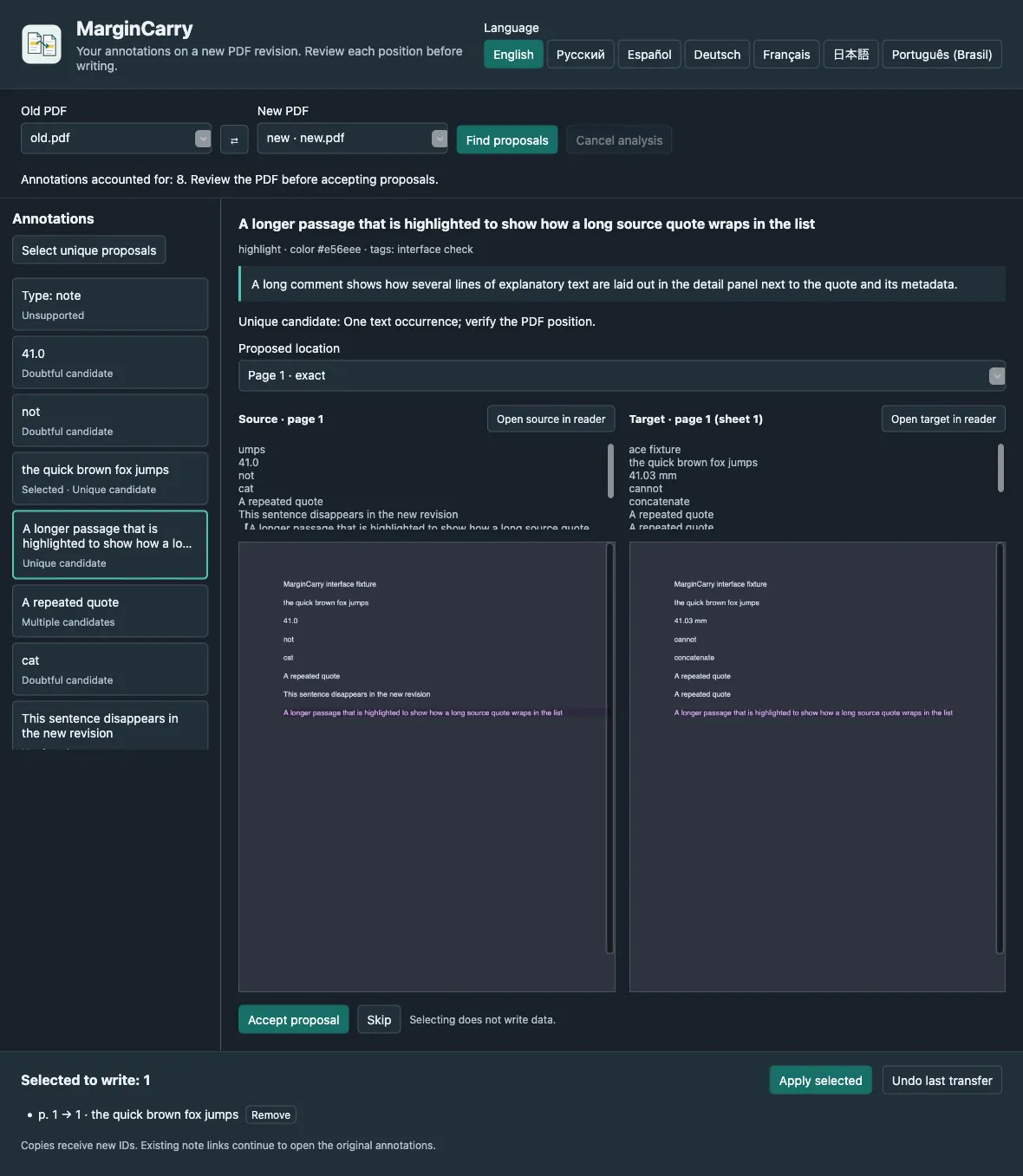
Was es tut
When a preprint or report is revised, your annotations stay on the old PDF. MarginCarry finds each highlighted passage in the new revision, shows the old and proposed positions side by side, and writes only the ones you accept. Originals are never changed, and every transfer can be undone.
Für wen
- Researchers and students who annotate papers in Zotero and receive updated versions.
- Reviewers who need to compare their notes against a revised manuscript.
Einschränkungen
- Only native highlights and underlines that stay on one page. Ink, image, note and multi-page annotations are not transferred.
- Personal libraries only, and two PDF attachments of one item. No group libraries or EPUB.
- Matching is exact: no fuzzy matching and no OCR. Scanned PDFs without a text layer are reported as such.
- Uses internal Zotero reader APIs; a future Zotero release may require an update.
Typische Einsätze
Move highlights to version 2
Attach the new PDF to the same Zotero item, open the MarginCarry window, and accept the proposals that look right. Comments, colours and tags travel with the copy.
Spot what changed
A quote that no longer exists is reported as not found. A number that changed from 41.0 to 41.2 is not moved onto the new number.
Undo safely
Each transfer is recorded locally. Undo moves exactly that transfer’s copies to the Zotero Trash.
Herunterladen
Neueste stabile Version v0.2.0, veröffentlicht am 31. Okt. 2026. Versionshinweise zu v0.2.0. Versionsdaten am 31. Okt. 2026 aus GitHub Releases abgerufen.
Zotero
- In Zotero: Tools → Plugins → gear menu → Install Plugin From File…
- Restart Zotero if asked.
Die Installationsschritte sind auf Englisch.
Download prüfen
margincarry-0.2.0.xpi.sha256 enthält SHA-256-Hashes der Release-Dateien. Stimmt der Hash überein, ist Ihre Datei identisch mit der veröffentlichten. Das ist eine Prüfsumme, keine Signatur des Autors: Sie belegt nicht, wer die Datei gebaut hat.
shasum -a 256 margincarry-0.2.0.xpiErster Start
Download the .xpi file. In Zotero, open Tools → Plugins, choose Install Plugin From File… in the gear menu, and select it.
Add the new PDF revision to the same item as the old one.
Open Tools → MarginCarry: transfer PDF annotations…, check Old PDF and New PDF, and press Find proposals.
Compare each proposal, accept or skip it, then press Apply selected and confirm.
Plattformen und wie sie geprüft wurden
- Zotero 10.0.x on macOSIm Betrieb geprüft
Tested on macOS, including real PDFs in seven languages.
- Zotero 10.0.x on Windows and LinuxUnterstützung angegeben, keine Laufzeitprüfung
Expected to work as a Zotero plugin, but not verified.
Dokumentation und Support
Fragen und Fehlerberichte gehören in den Issue-Tracker des Projekts. Sicherheitsprobleme melden Sie wie in seiner Sicherheitsrichtlinie beschrieben.