
Documents and research
MarginCarry
Keep your reading notes when a paper gets a new version. Carry your Zotero highlights and underlines to a new revision of the same PDF, reviewing each one before it is written.
- Release
- v0.2.0, Oct 31, 2026
- Runs on
- Zotero 10.0.5 or a later 10.0.x release (desktop)
- License
- Apache-2.0
What it looks like
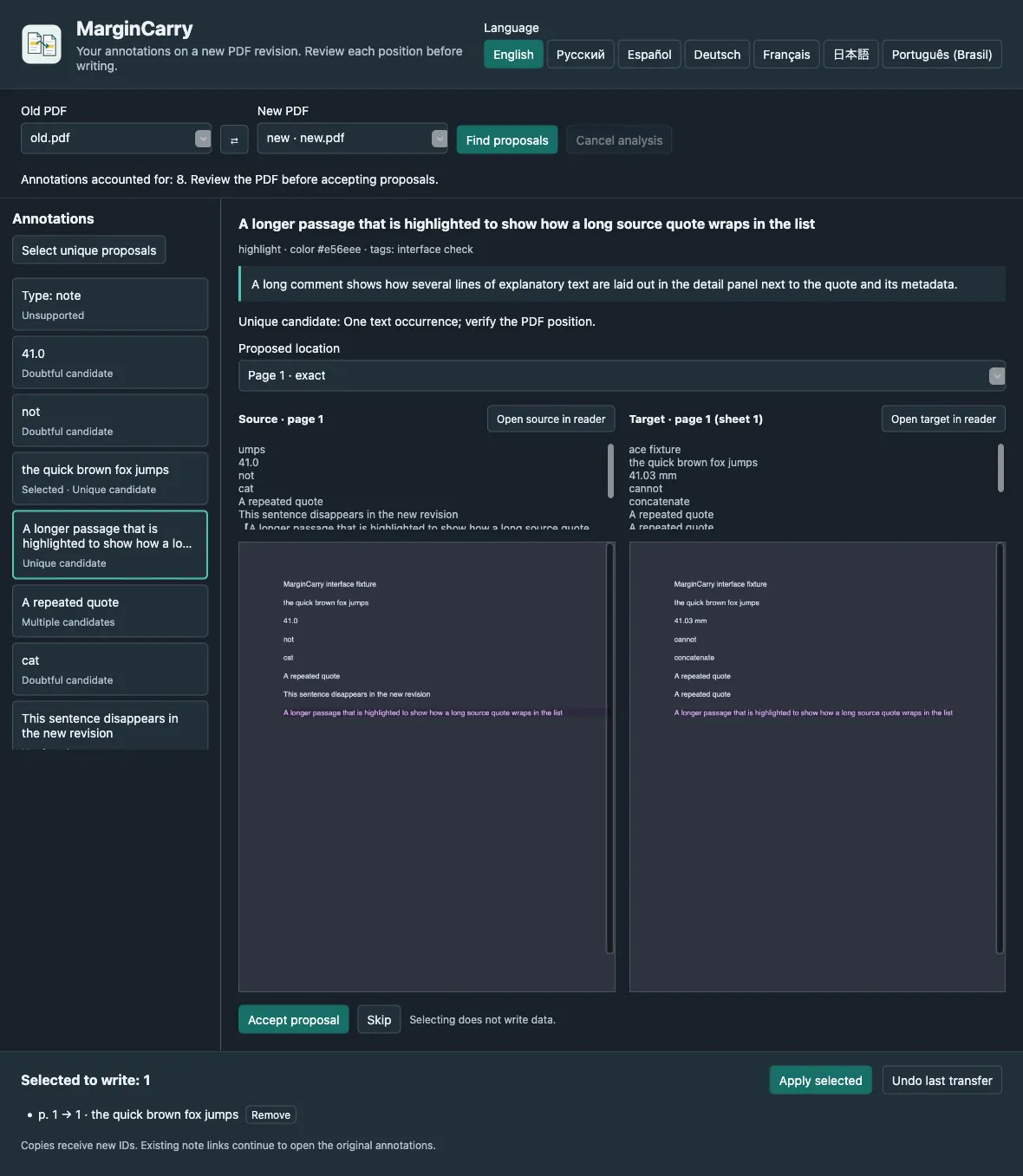
What it does
When a preprint or report is revised, your annotations stay on the old PDF. MarginCarry finds each highlighted passage in the new revision, shows the old and proposed positions side by side, and writes only the ones you accept. Originals are never changed, and every transfer can be undone.
Who it is for
- Researchers and students who annotate papers in Zotero and receive updated versions.
- Reviewers who need to compare their notes against a revised manuscript.
Limitations
- Only native highlights and underlines that stay on one page. Ink, image, note and multi-page annotations are not transferred.
- Personal libraries only, and two PDF attachments of one item. No group libraries or EPUB.
- Matching is exact: no fuzzy matching and no OCR. Scanned PDFs without a text layer are reported as such.
- Uses internal Zotero reader APIs; a future Zotero release may require an update.
Typical uses
Move highlights to version 2
Attach the new PDF to the same Zotero item, open the MarginCarry window, and accept the proposals that look right. Comments, colours and tags travel with the copy.
Spot what changed
A quote that no longer exists is reported as not found. A number that changed from 41.0 to 41.2 is not moved onto the new number.
Undo safely
Each transfer is recorded locally. Undo moves exactly that transfer’s copies to the Zotero Trash.
Download
Latest stable release v0.2.0, published Oct 31, 2026. Release notes for v0.2.0. Release data checked Oct 31, 2026 from GitHub Releases.
Zotero
- In Zotero: Tools → Plugins → gear menu → Install Plugin From File…
- Restart Zotero if asked.
Verify a download
margincarry-0.2.0.xpi.sha256 lists SHA-256 hashes for the release files. A matching hash shows that your file is identical to the one uploaded with the release. It is a checksum, not a signature from the author: it does not prove who built the file.
shasum -a 256 margincarry-0.2.0.xpiFirst run
Download the .xpi file. In Zotero, open Tools → Plugins, choose Install Plugin From File… in the gear menu, and select it.
Add the new PDF revision to the same item as the old one.
Open Tools → MarginCarry: transfer PDF annotations…, check Old PDF and New PDF, and press Find proposals.
Compare each proposal, accept or skip it, then press Apply selected and confirm.
Platforms and how they were checked
- Zotero 10.0.x on macOSVerified running
Tested on macOS, including real PDFs in seven languages.
- Zotero 10.0.x on Windows and LinuxDeclared support, no recorded runtime check
Expected to work as a Zotero plugin, but not verified.
Documentation and support
Questions and bug reports go to the project’s issue tracker. Report security problems as described in its security policy.