
文書と研究
MarginCarry
論文が改訂されても読書メモを失わない。Zotero のハイライトと下線を同じ PDF の新しい版へ移す。書き込む前に 1 件ずつ確認できます。
- リリース
- v0.2.0, 2026年10月31日
- 動作環境
- Zotero 10.0.5 以降の 10.0.x(デスクトップ版)
- ライセンス
- Apache-2.0
以下のプロジェクト説明は英語です。
画面
できること
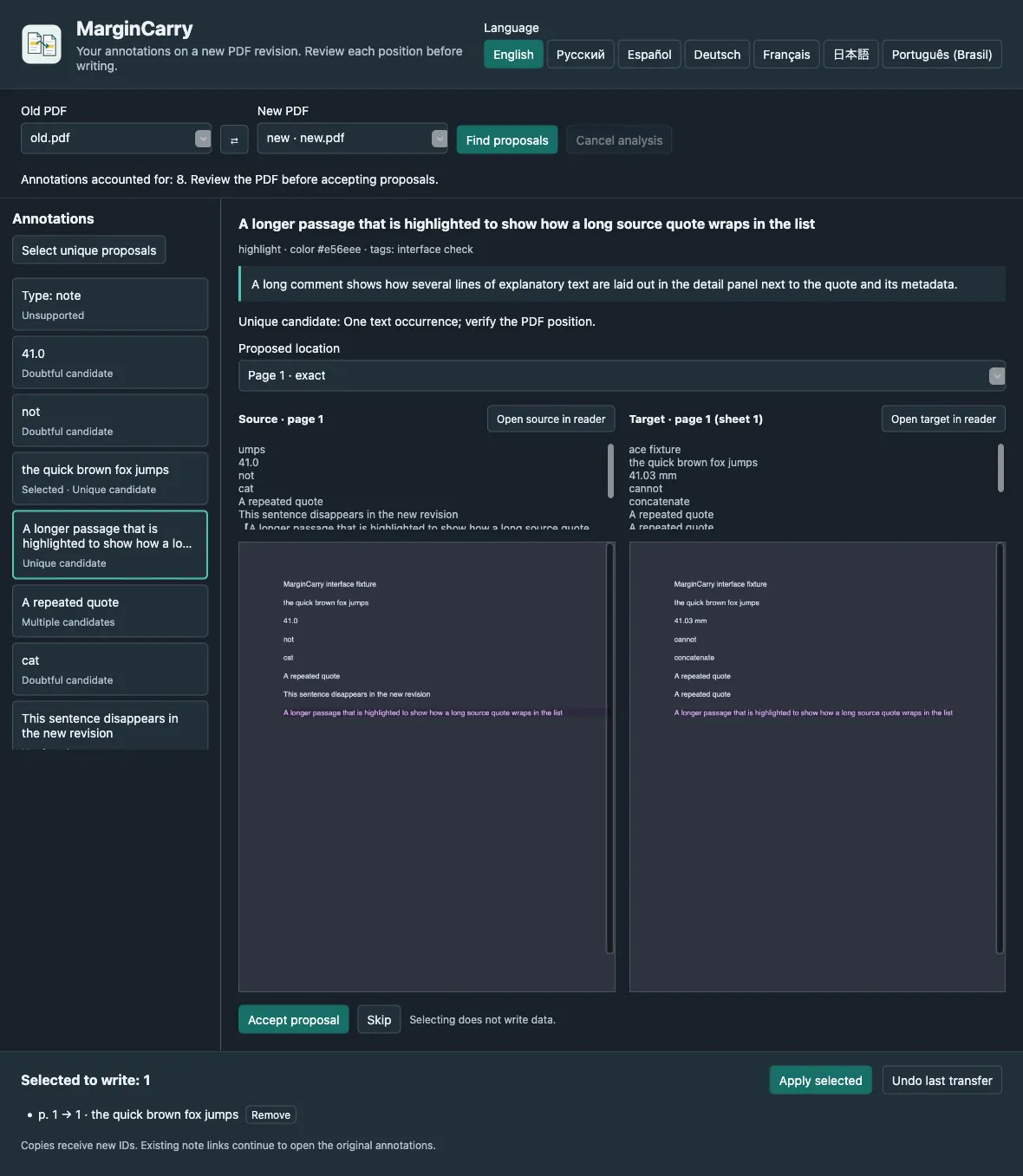
When a preprint or report is revised, your annotations stay on the old PDF. MarginCarry finds each highlighted passage in the new revision, shows the old and proposed positions side by side, and writes only the ones you accept. Originals are never changed, and every transfer can be undone.
対象
- Researchers and students who annotate papers in Zotero and receive updated versions.
- Reviewers who need to compare their notes against a revised manuscript.
制限事項
- Only native highlights and underlines that stay on one page. Ink, image, note and multi-page annotations are not transferred.
- Personal libraries only, and two PDF attachments of one item. No group libraries or EPUB.
- Matching is exact: no fuzzy matching and no OCR. Scanned PDFs without a text layer are reported as such.
- Uses internal Zotero reader APIs; a future Zotero release may require an update.
主な使い方
Move highlights to version 2
Attach the new PDF to the same Zotero item, open the MarginCarry window, and accept the proposals that look right. Comments, colours and tags travel with the copy.
Spot what changed
A quote that no longer exists is reported as not found. A number that changed from 41.0 to 41.2 is not moved onto the new number.
Undo safely
Each transfer is recorded locally. Undo moves exactly that transfer’s copies to the Zotero Trash.
ダウンロード
最新の安定版 v0.2.0(2026年10月31日 公開)。 リリースノート (v0.2.0). リリース情報は 2026年10月31日 に GitHub Releases から取得しました。
Zotero
- In Zotero: Tools → Plugins → gear menu → Install Plugin From File…
- Restart Zotero if asked.
インストール手順は英語です。
ダウンロードの検証
margincarry-0.2.0.xpi.sha256 にはリリースファイルの SHA-256 ハッシュが記載されています。ハッシュが一致すれば、ファイルはリリースで公開されたものと同一です。これはチェックサムであり作者の署名ではないため、誰がビルドしたかは証明しません。
shasum -a 256 margincarry-0.2.0.xpi初めて使うとき
Download the .xpi file. In Zotero, open Tools → Plugins, choose Install Plugin From File… in the gear menu, and select it.
Add the new PDF revision to the same item as the old one.
Open Tools → MarginCarry: transfer PDF annotations…, check Old PDF and New PDF, and press Find proposals.
Compare each proposal, accept or skip it, then press Apply selected and confirm.
対応環境と確認方法
- Zotero 10.0.x on macOS動作確認済み
Tested on macOS, including real PDFs in seven languages.
- Zotero 10.0.x on Windows and Linux対応をうたっているが動作は未確認
Expected to work as a Zotero plugin, but not verified.
ドキュメントとサポート
質問やバグ報告はプロジェクトのIssue トラッカーへ。セキュリティ上の問題はセキュリティポリシーに従って報告してください。